
Stop tab‑hopping.
Start fixing.
Every Google Ads and Meta client on one screen, with expected vs actual spend for each. Catch the drift while there is still month left to fix it.
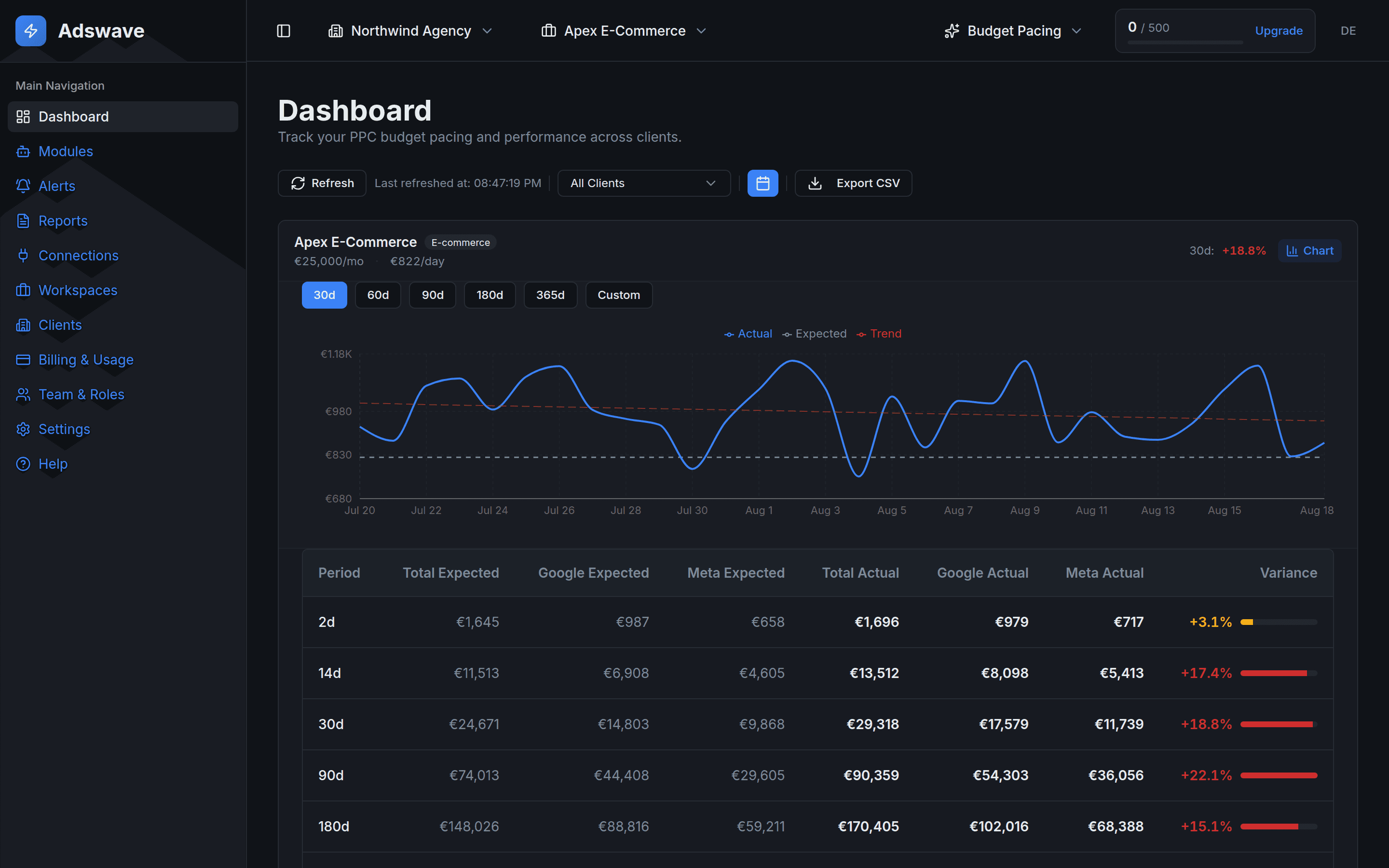
- 1+18.8% over pace. The 30-day variance, flagged while the month can still be saved.
- 2Actual vs expected, by day. See the exact day a client tipped over.
- 3Google and Meta, split. Six windows from 2 days to a year, plus any range you pick.
The checks the ad platforms make you dig for. On every client.
These are real captures from the Adswave demo workspace, not mockups. They are shown in dark mode, and the app also comes in light mode.
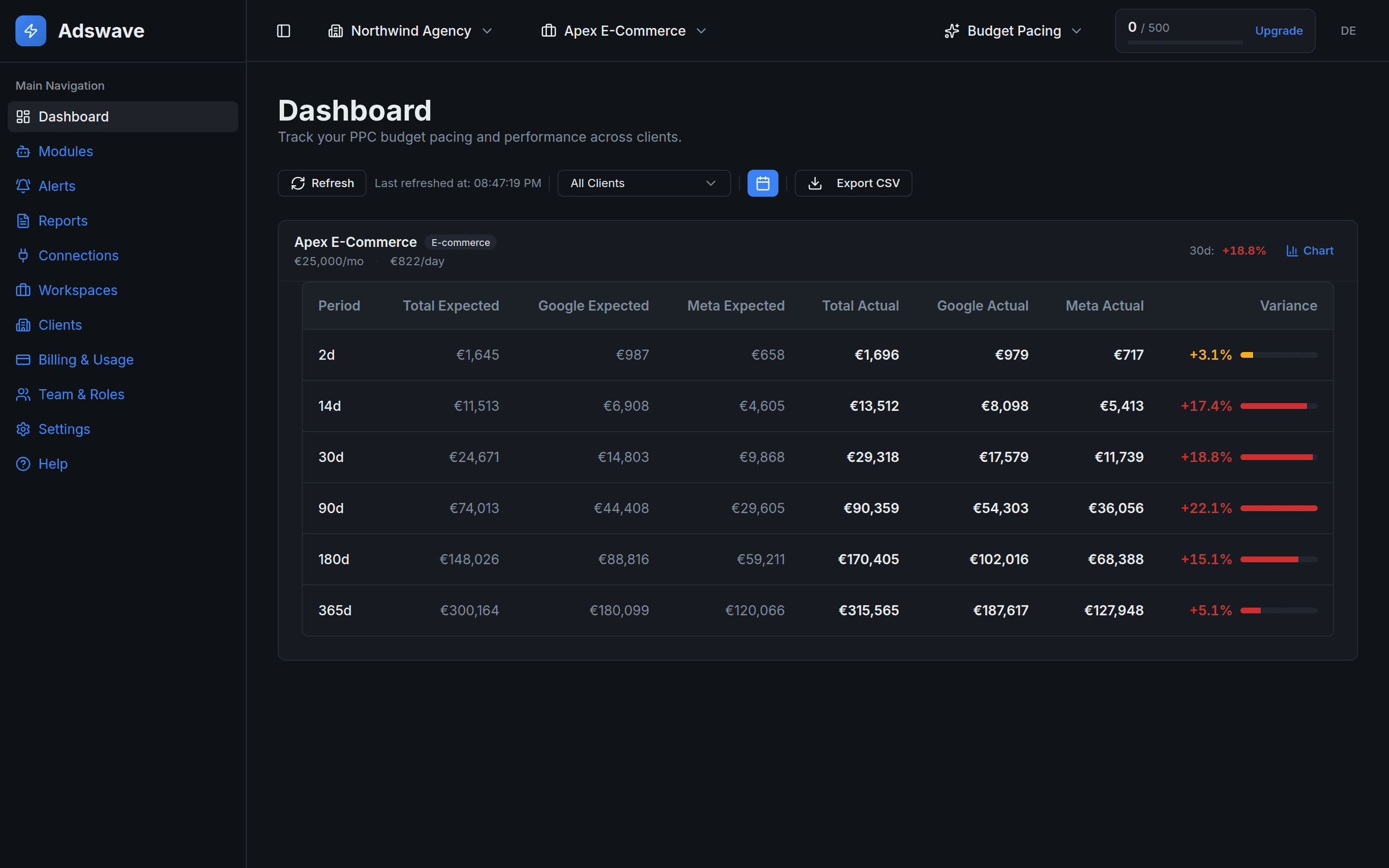
Expected vs actual, from 2 days to a year.
See each client's spend against budget in six windows from 2 days to a year, split by Google and Meta. Hourly alerts compare complete days and email your owners and admins when a client drifts past your limit.
- Overspend before month end
- Underdelivery you can still recover
- Which platform caused the drift
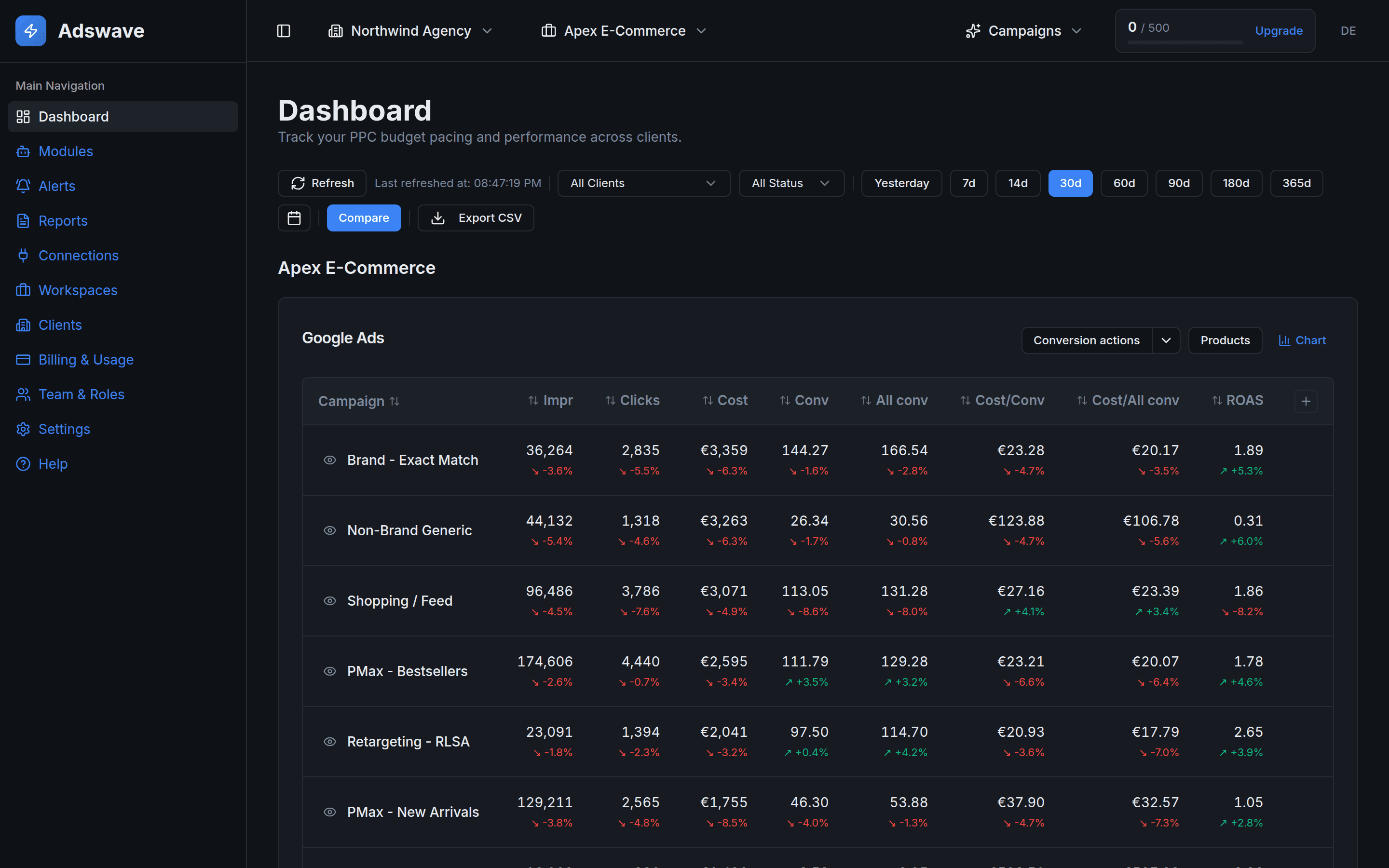
Google and Meta campaigns, on one page.
See every Google and Meta campaign for a client on one page. Switch the Google Ads table to conversion actions or Shopping products to see what drives each campaign.
- Winners and laggards across platforms
- Budget shifting between campaigns
- Product numbers the native apps bury
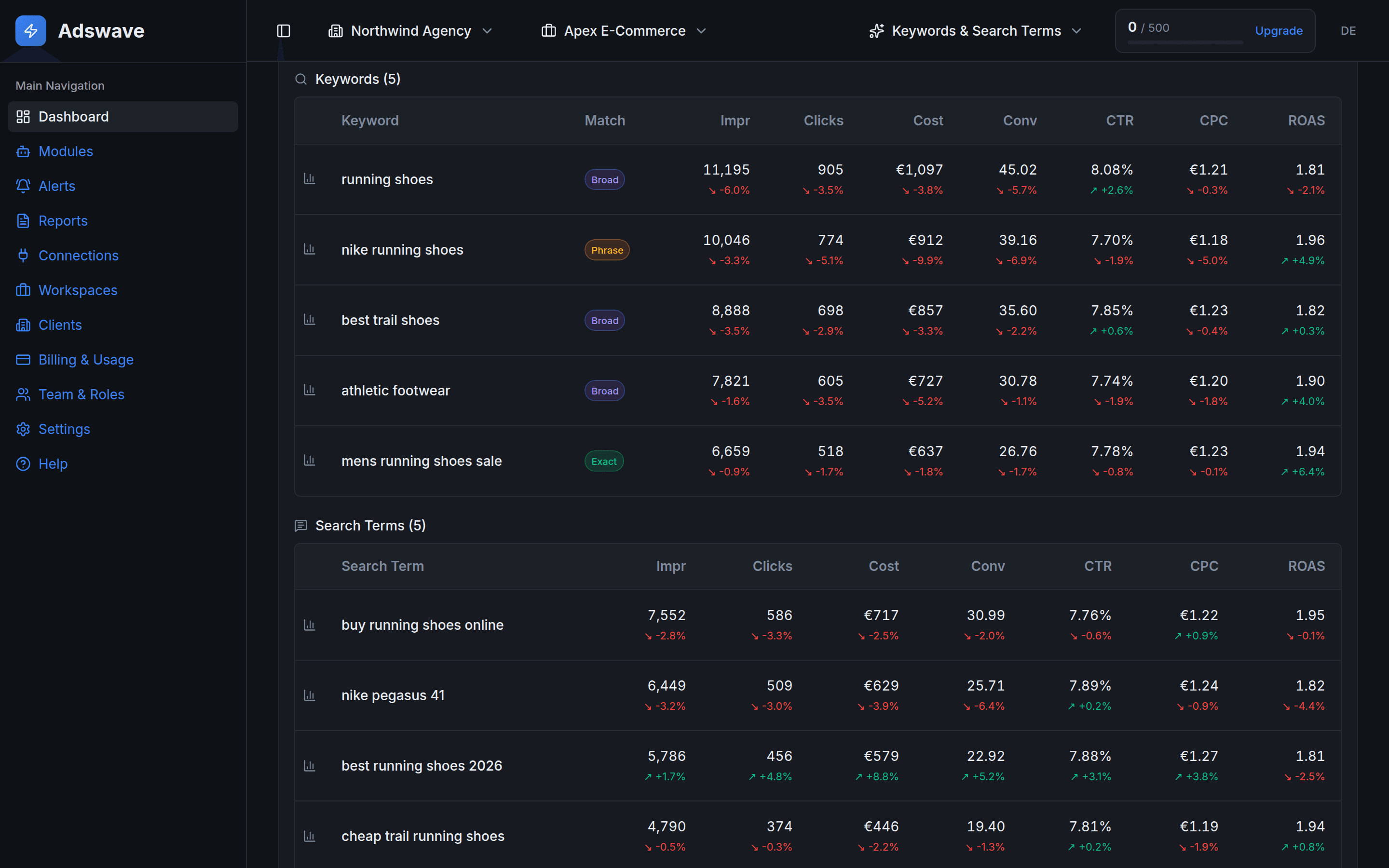
Find the spend that converts nothing.
See the top keywords and search terms in every campaign, with cost, CTR, CPC and ROAS side by side. Sort by cost, conversions or ROAS and cut the waste before it costs another week.
- Costly or irrelevant search terms
- Keywords with spend and no conversions
- Daily trend for any keyword or search term
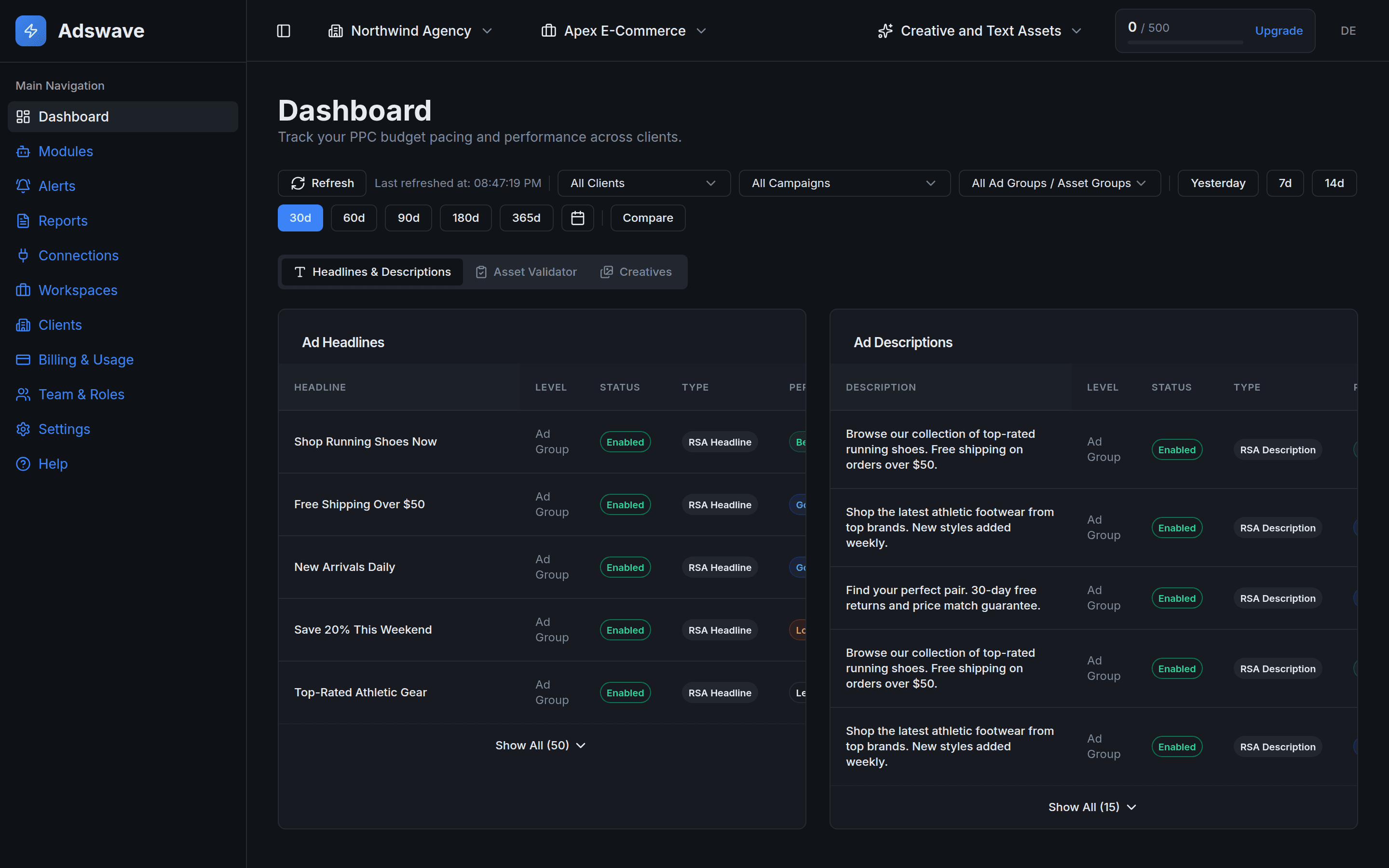
Spot weak headlines and missing assets.
See Google's rating on every RSA headline and description, and spot Performance Max asset groups with missing assets. Browse image and video creatives from Google and Meta in one gallery.
- Low-rated headlines and descriptions
- Incomplete asset groups
- Creatives across both platforms
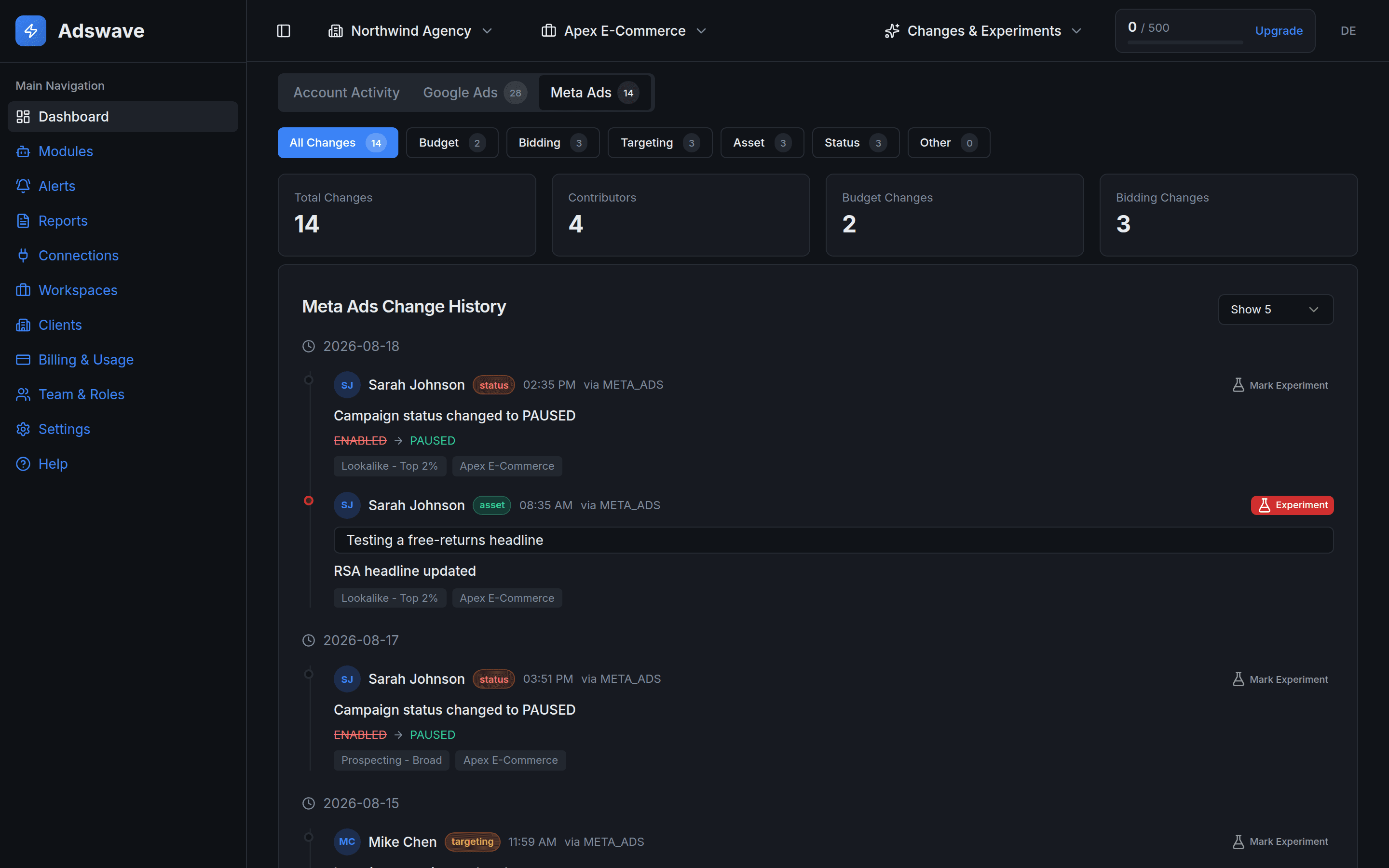
Who changed what, and what it did.
See up to 28 days of changes across Google Ads and Meta, with the person behind each one. Mark a change as a test and see it on your campaign charts.
- Budget, bidding, targeting and asset edits
- Who made each change
- Test markers on your campaign charts
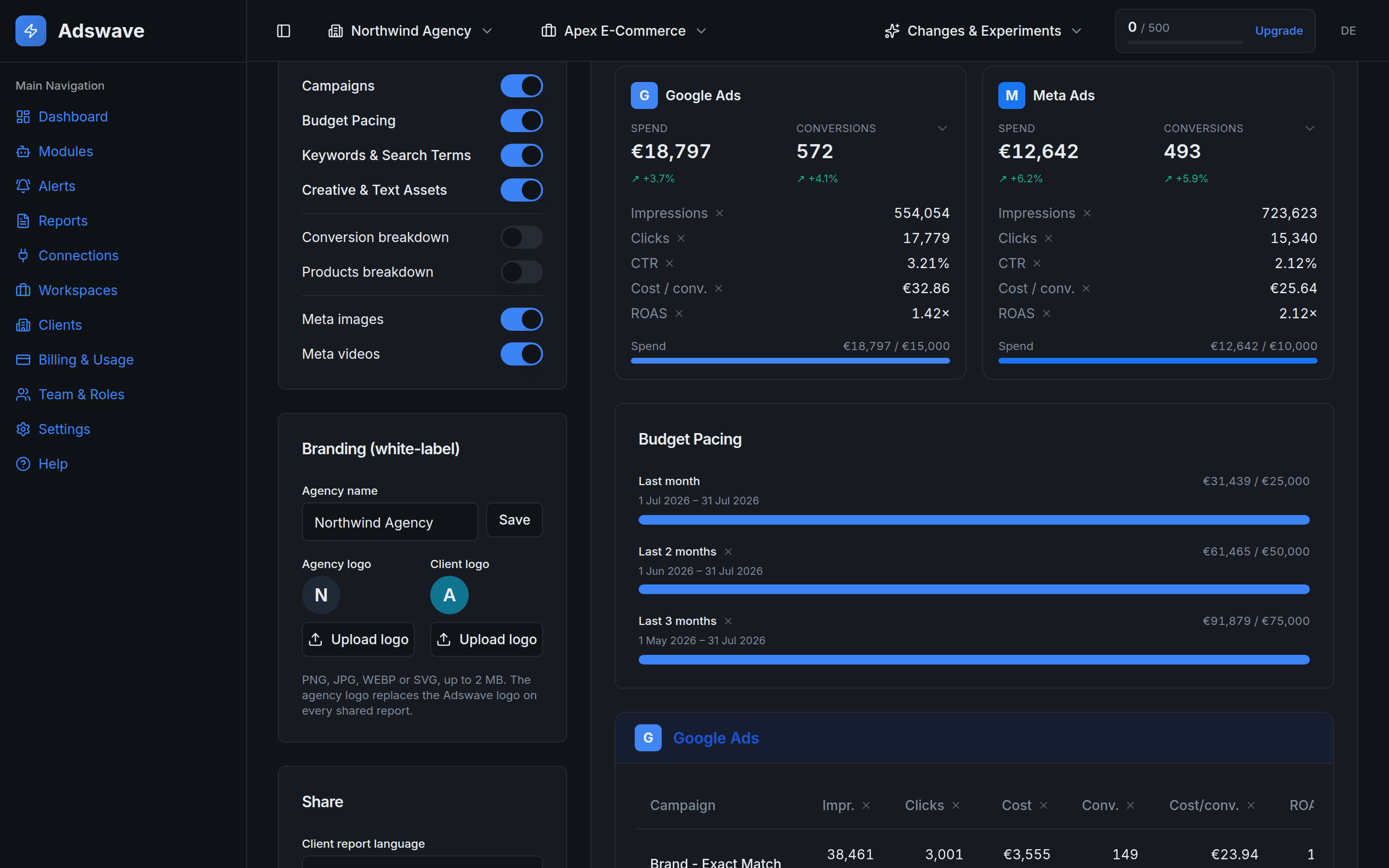
Your logo, their language.
Choose the modules a client sees and add both logos. Share a read-only link with no client login, or email it every week or month.
- Your logo and your client's
- English plus 11 languages
- Scheduled email and PDF export
Is this client on budget? Find out in ten seconds.
Enter a client's monthly budget and what it has spent so far. We compare that with an even spend across the month, using the same daily rate as the Adswave dashboard.
An even pace spends the same amount every day of an average 30.4-day month. Within 5% of that counts as on track here. The dashboard's month-to-date pace uses the same 5% band. Its colours turn amber past 2%.
An even pace would have spent €1,480 by day 15. This client has spent €1,720, which is 16.2% more.
At this rate the month ends at €3,486, which is €486 over budget.
Then stop checking. Adswave emails you when a client drifts.
Set a rule once for a client or an ad account. Every hour, Adswave checks it against complete days up to yesterday and emails your owners and admins when it triggers.
- WhatBudget pacing or a metric you pick
- ThresholdFrom 5% to 50%
- DirectionOver, under or either
- ScopeA client or one ad account
An alert rule for Apex E-Commerce (ad account Apex Store (Google Ads)) in Northwind Agency just triggered.
Apex Store (Google Ads) — Actual spend over the last 7 complete days (excluding today) is 4,013.49 against expected 3,453.95 (+16.2% vs expected).
Manage alert rules and email preferences from the Alerts page in Adswave.
Up and running in five minutes.
No scripts and no data warehouse. Link the accounts you already run and the checks start.
Connect your ad accounts
Sign in with Google and Meta, so no passwords are shared. You can revoke access any time from either side.
Group accounts by client
Assign each ad account to a client and set its monthly budget. Group clients into workspaces and invite your team.
How the all-clients view works →See what to fix, then share it
Adswave flags budget drift and metric swings on each client. Send a branded report when you are done.
Report builders show numbers. Adswave shows what to fix.
Dashboards and scheduled PDFs solve a different problem. Adswave is the check you run before the client asks.
Scroll sideways to see all four tools.
| Feature | Adswave | Data Studio | Whatagraph | AgencyAnalytics |
|---|---|---|---|---|
| Budget pacing, expected vs actual over time | Built in | Build it yourself | Spend goals and a pacing widget | Budget pacing with spend goals |
| Checks on campaigns, products, search terms, creatives and changes | Built in | Chart alerts on Pro, the rest you build | KPI alerts and anomaly insights | KPI alerts and anomaly detection |
| Google Ads + Meta in one view | Yes | Meta needs a third-party connector | Yes | Yes |
| Starting price | €19.99 / mo+ VAT, billed monthly | Free* | from €699 / mobilled yearly | $20 / client / mobilled yearly, $25 monthly |
| Read-only, never edits your campaigns | Yes | Yes | Yes | Yes |
*Data Studio (formerly Looker Studio) is free for individuals. Chart alerts need Data Studio Pro, and you build the budget pacing and audit logic yourself. Whatagraph's cheapest published plan, Max, is €699 a month billed yearly (€8,388 a year). AgencyAnalytics is $20 per client per month billed yearly, or $25 billed monthly. Competitor prices and features as each provider published them in October 2026. Check each provider for current plans.
Where Adswave is not the right fit
Better you hear it now than on day six of your trial.
- You want the edits made for you.Adswave is read-only. You make every change in Google or Meta.
- You run TikTok, LinkedIn or Microsoft Ads.Adswave covers Google Ads and Meta only.
- You need a long-term data store.Adswave keeps no archive of your ad data, and the change log covers 28 days.
- You want automated recommendations.Optimization suggestions are not live yet.
Read-only by design. No archive of your ad data.
We pull fresh numbers from Google and Meta when you need them and cache them only briefly for speed. You decide what to connect and when to revoke.
Priced per client list, not per seat.
Every plan includes Google Ads, Meta and unlimited team seats. You start with a free 7-day trial of Standard, no card needed.
Basic
- ✓5 clients · 3 workspaces
- ✓Unlimited team seats
- ✓50 analysis runs / month
- ✓Budget pacing and Campaigns
- ✓Up to 20 alert rules, checked hourly on complete days
- ✓1 Google Ads + 1 Meta account per client
- ✓Email support
Standard
- ✓12 clients · 3 workspaces
- ✓100 analysis runs / month
- ✓Keywords and Creatives modules
- ✓Branded client reports in English + 11 languages
- ✓Share by link with no client login, or PDF
- ✓2 accounts per platform per client
- ✓Up to 50 alert rules
- ✓Every module for +€29.99 / month
Pro
- ✓35 clients · 10 workspaces
- ✓500 analysis runs / month
- ✓Every module, current and future
- ✓Change history for the last 28 days, with test markers
- ✓3 accounts per platform per client
- ✓Up to 200 alert rules
- ✓Priority support and early access
Prices exclude VAT, which checkout adds where it applies. EU businesses with a valid VAT number pay none (reverse charge). Billed monthly in euros. Cancel anytime from Billing and keep access to the end of the period.
Enterprise
Check a client's pacing without signing up.
The calculators show the formula behind every number and need no account. The guides cover budget pacing and overspend on Google Ads and Meta.
Calculators
- Budget pacing calculatorIs a client ahead of or behind their monthly budget? Expected spend, variance and projected month end for one budget, Google Ads and Meta alike.
- Google Ads daily budget calculatorTurn a monthly budget into the daily budget to enter in Google Ads, with the most Google can spend in a day and in the month.
- Mid-month budget adjustment calculatorA client is off course on the 13th. The daily budget that lands the month on target from today, and what a single day can still cost.
Guides
- Agency overspent a client's ad budget: what nowGoogle can spend 30.4x a daily budget in a month and 2x in a day. Find the real cause, check who pays under your contract, and tell the client.
- Budget pacing formula, with the 30.4 ruleExpected spend = monthly budget / 30.4 × days. Variance = (actual - expected) / expected. A worked euro example, plus the 31-day and February skew.
- How to catch a Google Ads or Meta overspend before your client doesGoogle can spend 30.4 times your daily budget in a month and 2 times it in a day. Meta will not say its ceiling. Neither has a monthly budget field.
- Google Ads budget pacing template for SheetsA free CSV for Google Sheets with every pacing formula shown: daily budget (budget / 30.4), expected to date, variance, month-end projection and catch-up.
- Why Google Ads spent more than your daily budgetGoogle Ads can spend up to 2x your average daily budget on a day and 30.4x it in a month. A €50 budget allows €100 a day and €1,520 a month.
Who is Adswave for?
Agencies and in-house teams managing Google Ads and/or Meta Ads across multiple clients. Solo marketers can start on the Basic plan.
Which platforms do you support?
Google Ads and Meta Ads. Connect both and review them side by side in one place. Figures are fetched live from both platforms, with no spend or performance tables kept on our side.
Does Adswave change my campaigns?
No. Adswave is read-only. We show you what to fix; you stay in control and make changes in Google and Meta yourself. Read the full access model
How long does setup take?
Sign in with Google and Meta, add a client, link its ad accounts and enter its monthly budget. Budget pacing then shows on your dashboard, usually in under five minutes. Getting started guide
How fresh is the data?
Adswave fetches numbers from your Google and Meta accounts when you open a view and caches them briefly for speed: usually five minutes, at most 30. Date ranges that ended more than 28 days ago are cached for a day, because the platforms no longer change them. If a connection expires, you will get a prompt to reconnect.
What's the difference between a workspace and a client?
A client is one brand or advertiser. A workspace groups clients however you work: by industry, by region, or by the team lead who owns them (for example, "Albert's clients").
Can I invite my team?
Yes. Invite teammates as Admins or Members, and an Owner can make a teammate an Owner later. Team seats are unlimited on every plan.
How are plan limits measured?
Plans set how many clients and workspaces you can manage, how many ad accounts you can link per client, how many alert rules you can keep, and how many data refreshes (analysis runs) you get per billing period. Team seats are unlimited on every plan. See pricing and plan limits
Is there a free trial?
Yes. Your first organisation starts with a 7-day free trial of the Standard plan, no credit card required. After the trial, pick a plan to keep access to your tools and reports. Compare the plans
Can I cancel anytime?
Yes. Cancel from Billing whenever you like and keep access through the end of your billing period. You can disconnect any ad account or request data deletion at any time.
Find the drift before your client does.
Connect Google Ads and Meta and see every client's pacing in under five minutes.